
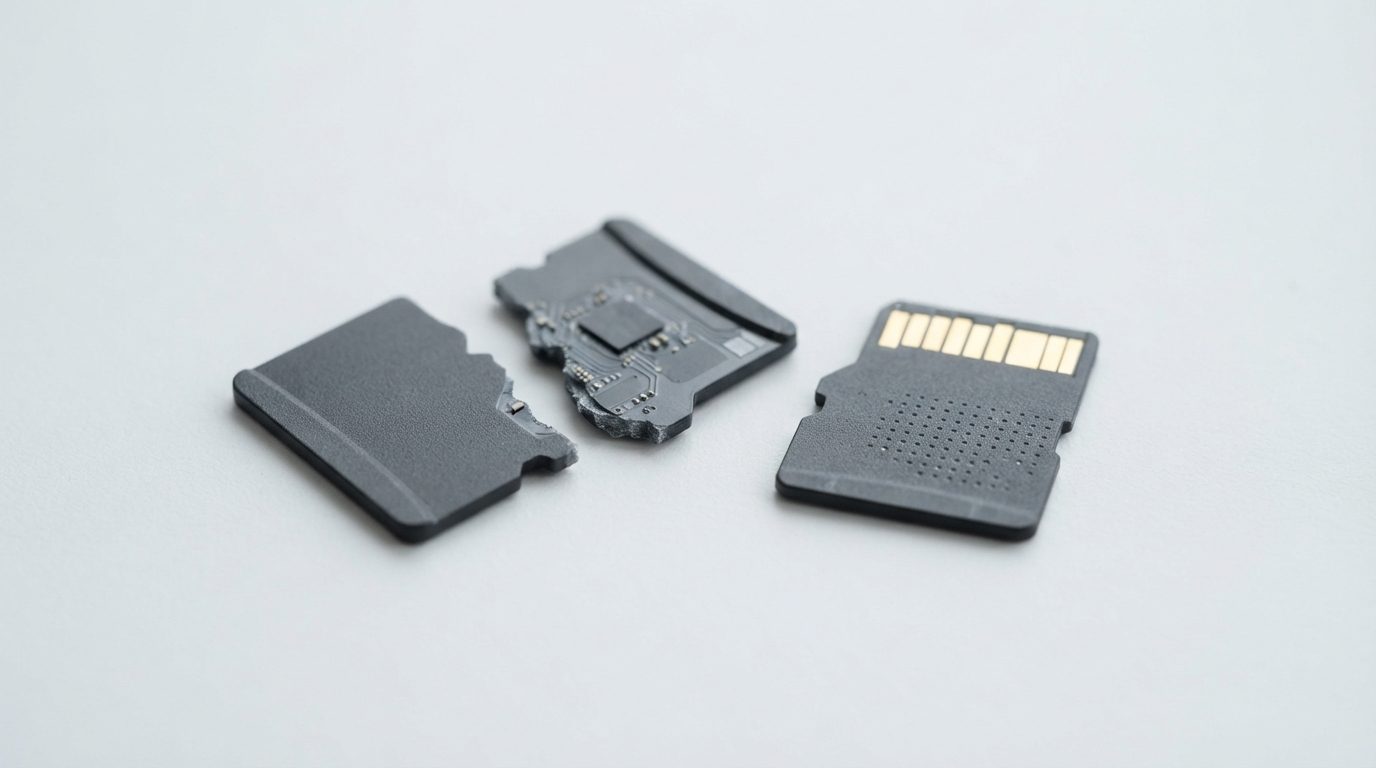
Quick answer: MicroSD chip-off recovery is a lab technique for cards that are snapped, cracked, shorted or completely dead. Most microSD cards are one sealed chip, so technicians usually expose hidden contact points, read the NAND memory directly and rebuild your files in software. If your card is damaged, stop using it and keep every piece.
A microSD card is about the size of a fingernail, but it can hold years of photos, dashcam footage or drone video. When one snaps in a phone tray or stops responding after a short circuit, normal recovery tools can’t reach it. That’s when microSD chip-off recovery comes in. This guide explains what it is, when you need it, what you should do right now and where its limits are.
What is microSD chip-off recovery?
MicroSD chip-off recovery means reading the card’s flash memory directly instead of going through its broken parts. A technician bypasses the failed controller, contacts or circuit, copies the raw contents of the NAND memory, then rebuilds the original files in software. It’s used when the card can’t communicate at all.
Every SD card has two key parts. NAND is the flash memory that actually stores your data. The controller is a small processor that manages that memory and talks to your camera or phone through the gold contacts.
In larger SD cards and many USB sticks, the NAND is a separate chip that can be removed from the board. That is “chip-off” in the classic sense. Most microSD cards are different. They are monolithic: the controller and NAND are sealed together in one block of epoxy. There is no separate memory chip to lift off.
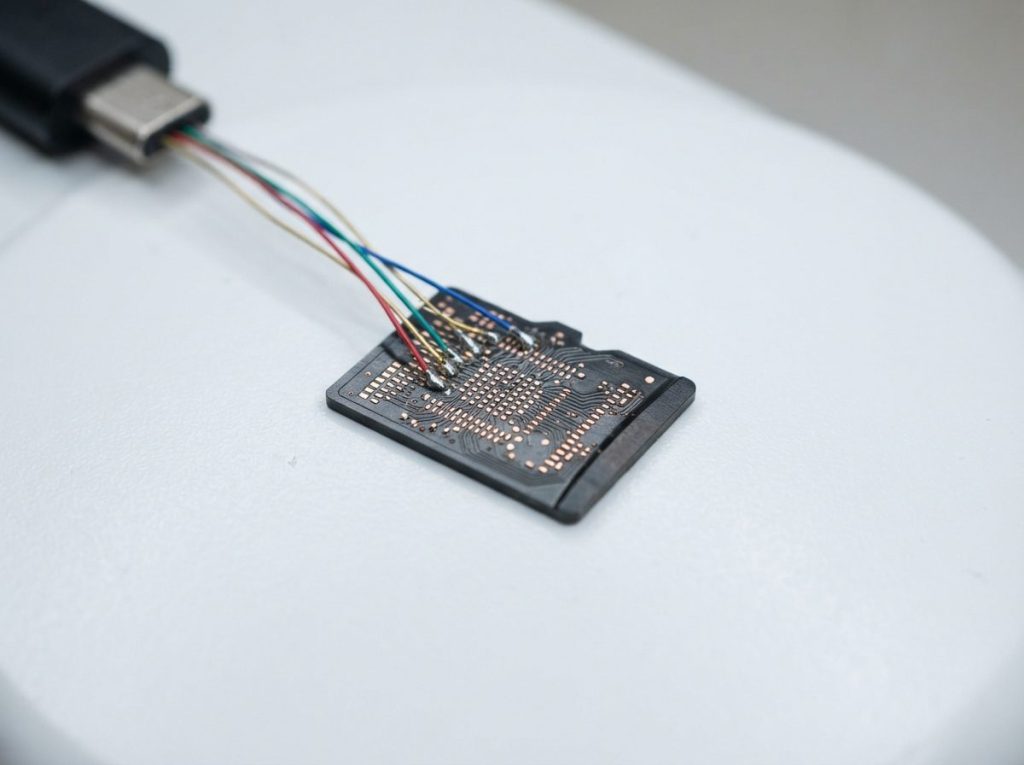
For these cards, the lab instead uncovers tiny hidden test pads on the card’s underside and connects to the memory bus through them. The name “chip-off” is still widely used, because the goal is the same: read the memory directly and leave the dead controller out of the process.
When does a microSD card need chip-off instead of regular recovery?
A microSD card needs chip-off recovery when the path to the data is broken but the memory itself is likely intact. Typical situations include:
- Snapped or cracked cards. Often caused by a phone tray, a laptop slot or being stepped on.
- Damaged contacts. Gold pads that are scraped off, burnt or lifted.
- Electrical damage. A faulty charger, device short or power surge can kill the controller.
- Controller or firmware failure. The card suddenly shows 0 bytes, a tiny wrong capacity or a generic device name, or it isn’t detected at all.
- Corrosion after liquid exposure. Moisture can corrode the contacts or internal traces.
Chip-off is not the first tool for logical problems. If you deleted photos, formatted the card by mistake, or the card still reads but asks to be formatted, the hardware is usually fine. Our guide on how to recover deleted photos from an SD card covers those cases.
What should you do right now with a broken or dead microSD card?
Stop using the card, remove it from the device and keep it exactly as it is. Every reinsertion, power-up or repair attempt can turn a recoverable card into an unrecoverable one. Use the table below to match what you see with the safest next step.
| Symptom | Likely cause | What to do | What not to do |
|---|---|---|---|
| Card is snapped or cracked | Physical break through the package or internal traces | Collect every fragment and store them together in a small container | Don’t glue, tape or force the pieces into a reader |
| Contacts scraped, burnt or lifted | Damaged connection between controller and device | Remove the card and keep it dry and clean | Don’t scrape, sand or re-solder the pads yourself |
| Card got wet | Short circuit risk and corrosion | Take it out of the device and seek an evaluation soon | Don’t insert it, power it or dry it with a hair dryer or oven |
| Card died after a short or surge, or felt hot | Failed controller or burnt components | Stop and set it aside | Don’t keep testing it in other phones and cameras |
| Shows 0 bytes, wrong size or sudden write protection | Controller or firmware failure | Copy nothing, change nothing, get it evaluated | Don’t format it or run repair tools |
| Readable but asks to be formatted | Usually file system (logical) damage | Stop writing to it; seek help if the files matter | Don’t accept the format prompt or run CHKDSK or First Aid |
Then follow these steps:
- Power off the device and remove the card gently. If a broken piece is stuck in a slot, leave it there rather than digging it out.
- Gather all fragments, even tiny chips of plastic. Put them in a small labelled envelope or an antistatic bag.
- Note what the card was used in (phone model, camera, drone, dashcam) and how it was formatted, if you know.
- Write down whether it was set up as phone storage. Some Android phones can format a card as internal storage and encrypt it. If so, keep the phone too.
- List the files you need most. This helps the lab check the right folders during verification.
How does chip-off recovery work on a microSD card?
Chip-off recovery reads the raw contents of the flash memory, then rebuilds the file system the controller originally managed. At Prime Data Recovery in North York, the work follows the same controlled order we use for every device.
1. Free evaluation and diagnosis
The card is inspected under magnification. The technician checks where the damage is, whether the silicon inside appears intact and whether the controller still responds in any way. Sometimes a less invasive method works, and chip-off isn’t needed.
2. Findings, quote and your approval
You receive a clear explanation of the problem and a quote. Nothing invasive happens until you approve it, because chip-off work changes the card permanently.
3. Physical preparation
For a monolithic microSD card, the protective layer on the underside is carefully polished away to expose microscopic test pads. The technician then identifies the pinout, meaning which pads carry data, commands and power for the NAND. Fine wires connect those pads to a reader adapter. For cards with a separate NAND chip, the chip is removed with controlled heat, cleaned and placed in a matching socket adapter.
4. Reading the raw NAND (imaging)
Specialized readers such as PC-3000 Flash and the Rusolut Visual NAND Reconstructor read every page of the memory, including the hidden spare areas that hold error-correction data. This copy is called an image or raw dump. All later work happens on the image, never on the original memory.
5. Reconstruction and file verification
A raw dump isn’t readable yet. The controller scrambled data, spread it across blocks for wear levelling and stored error-correction codes alongside it. The lab corrects bit errors, reverses the scrambling (often an XOR pattern), puts pages and blocks back in order, and rebuilds the translator, the map that links logical addresses to physical locations. Then the file system, usually FAT32 or exFAT on SD cards, is rebuilt and your files are extracted. You can check the results in a file verification session before delivery.
6. Delivery on new storage
Recovered files are delivered on a new, healthy storage device. The original card can’t be reused after this process. You can read more about each stage in how the data recovery process works.
Can every broken microSD card be recovered?
No. Chip-off recovery only works if the memory die inside the card survived the damage. Recovery isn’t possible, or becomes much harder, in these situations:
- Cracked or shattered silicon. If the break runs through the NAND die itself, the cells holding your data are gone.
- Burnt memory. A severe electrical event can damage the NAND as well as the controller.
- Encryption. If a phone encrypted the card as internal storage, the key stays on the phone. Without the working phone, the raw data may be unreadable.
- Unknown controller methods. Some controllers use scrambling or layouts that are poorly documented, which makes reconstruction slow or incomplete.
- Heavy wear. Worn or degraded flash cells produce more bit errors than the correction codes can fix.
Because of these limits, no honest lab can promise results before the card is examined. What you can control is the card’s condition: the fewer attempts made on it, the better the chances.
What common mistakes make a damaged microSD card harder to recover?
Most avoidable losses come from well-meant repair attempts at home. Avoid these:
- Gluing or taping broken halves. Adhesive seeps onto pads and traces and must be removed later, risking more damage.
- Forcing a cracked card into a slot. This can short the circuit or snap the card further.
- Scraping the card yourself after watching online videos. One slip with sandpaper or a blade destroys the test pads.
- Using heat to dry a wet card. Hair dryers and ovens can warp the card and speed up corrosion.
- Accepting a format prompt or running CHKDSK or First Aid. These tools write to the card and can overwrite file system records.
- Trying several recovery programs on a card that behaves oddly. If the problem is physical, software can’t fix it, and every attempt adds stress.
When should you contact a professional lab?
Contact a lab whenever the card is physically damaged, was exposed to liquid or electricity, or simply isn’t detected and the files matter to you. These cases need direct access to the memory, which requires specialized hardware and experience.
Prime Data Recovery handles damaged memory cards at its lab in North York, Toronto. Customers elsewhere in Canada can ship their cards. Evaluation is free, the “No Data, No Fee” policy applies, and your files are handled confidentially in line with Canadian privacy law (PIPEDA). Learn more about our SD card data recovery service.
Key takeaways
- Chip-off recovery reads a microSD card’s NAND memory directly when the controller, contacts or circuit have failed.
- Most microSD cards are monolithic, so the lab exposes hidden test pads instead of desoldering a chip.
- The raw data must be descrambled, error-corrected and rebuilt before files appear.
- Recovery depends on the memory die surviving. Encryption tied to a phone can block access.
- Keep every piece, don’t power or reinsert the card, and never glue, sand, heat or format it.
If your microSD card is snapped, wet or dead, set it aside and request a free evaluation. You can also call (416) 661-1112 to talk through the damage before you bring or ship the card.
Frequently Asked Questions
Will my microSD card work again after chip-off recovery?
No. Chip-off recovery is a destructive process. The protective coating is polished away or the memory chip is removed, so the card can't be used again. That's why you approve the work after the free evaluation, and why recovered files are delivered on a new, healthy storage device rather than on the original card.
Can data be recovered from a microSD card that was formatted as internal storage on an Android phone?
Sometimes, but it's harder. When Android uses a card as internal storage, it encrypts the card with a key kept on the phone. A lab can read the raw memory, but the files may stay unreadable without the key. If you still have the phone, keep it powered off and unchanged, and bring it in along with the card.
How long does microSD chip-off recovery take?
It depends on the damage, the card's capacity and how well documented its controller is. Preparing the pads, reading the memory and reversing the controller's data layout can each take a long time on difficult cards. After the free evaluation, the lab can explain what your specific card needs before you approve any work.
Is chip-off recovery different for full-size SD cards?
Often, yes. Many full-size SD cards and USB sticks have a separate NAND memory chip on a small circuit board. That chip can be desoldered and read in a socket adapter. Most microSD cards are monolithic, with controller and memory sealed together, so technicians reach the memory through hidden test pads instead.
How should I ship a broken microSD card for recovery?
Put all the pieces in a small antistatic bag or labelled envelope so nothing gets lost. Place that inside a small rigid box with padding, then inside a padded mailer or larger box. Don't tape pieces together or to paper. Include a note listing the device it came from and the files you need most.
Can a microSD card snapped in half still have recoverable photos?
Often, yes, if the break missed the memory die inside. A snapped card's plastic and traces may be ruined while the NAND still holds intact data. Only an inspection under magnification can confirm this. Keep both halves, don't try to join them, and avoid inserting either piece into any device.
