
Quick answer: Data recovery pricing depends on what went wrong with the device, not on how much the files mean to you. A deleted file on a healthy drive needs far less work than a drive with failed read/write heads or a damaged RAID. An honest price comes after a proper diagnosis. Until then, power the device off and don’t attempt fixes yourself.
When a drive fails, the first thing most people ask is what it will cost to get the files back. It’s a fair question, but data recovery pricing doesn’t work like buying a new drive. Two drives that look the same on the outside can have completely different problems inside, and the amount of work each one needs can differ a lot.
This guide explains what you’re actually paying for, why a single advertised price can be misleading, what a good quote should include, and how to avoid the mistakes that make recovery harder and more expensive.
Why is there no single price for data recovery?
There’s no single price because the cost comes from the type and severity of the failure, and nobody can know that until the device has been diagnosed.
Take a 2 TB external drive. In one case, someone deleted a folder by mistake and the drive is healthy. In another, the drive fell off a desk and now clicks. Same model, same capacity. The first case may only need careful software work on a copy of the drive. The second may need a cleanroom, matching donor parts and hours of slow, controlled reading.
That’s why a responsible lab gives you a quote after the evaluation, not before it. A price given over the phone without seeing the device can only be a guess.
What factors affect data recovery pricing?
The main factors are the type of failure, the parts and equipment needed, the time it takes to image the device, and how complex the data structure is.
The table below shows how the work changes from one type of problem to another. It compares relative effort, not dollar amounts, because each case is quoted on its own.
| Type of problem | What the lab usually has to do | Relative effort |
|---|---|---|
| Deleted files or a formatted partition (logical issue) | Image the device, then rebuild the file system (for example NTFS, APFS, exFAT) from the copy | Lower |
| Drive detected but very slow, with bad sectors (areas that can’t be read reliably) | Controlled imaging that reads the healthy areas first and returns carefully to weak ones | Moderate |
| Firmware problem (the drive’s internal operating code in the “service area” is corrupted) | Repair the firmware or translator (the map from logical addresses to physical locations) with specialized hardware tools | Moderate to higher |
| Failed PCB (the drive’s circuit board) | Repair or replace the board and move the unique ROM/adaptives data that each drive needs | Moderate to higher |
| Clicking or not spinning (failed heads, stuck motor or stiction) | Open the drive in a cleanroom, perform a head stack replacement with parts from a compatible donor drive, then image | Higher |
| SSD that is not detected (controller or firmware fault) | Work on the controller (the chip that manages the NAND flash memory) and translate the data correctly | Higher |
| RAID, NAS or server failure | Image every member disk, then perform RAID reconstruction (working out disk order, stripe size and parity) before recovering files | Highest, and depends on the number of disks |
Capacity matters too, but less than people expect. A larger drive takes longer to image, and that time goes up a lot when the drive has many weak areas.
Why does physical damage cost more than a software problem?
Physical damage costs more because it needs a cleanroom, compatible donor parts and much slower, more careful reading of the drive.
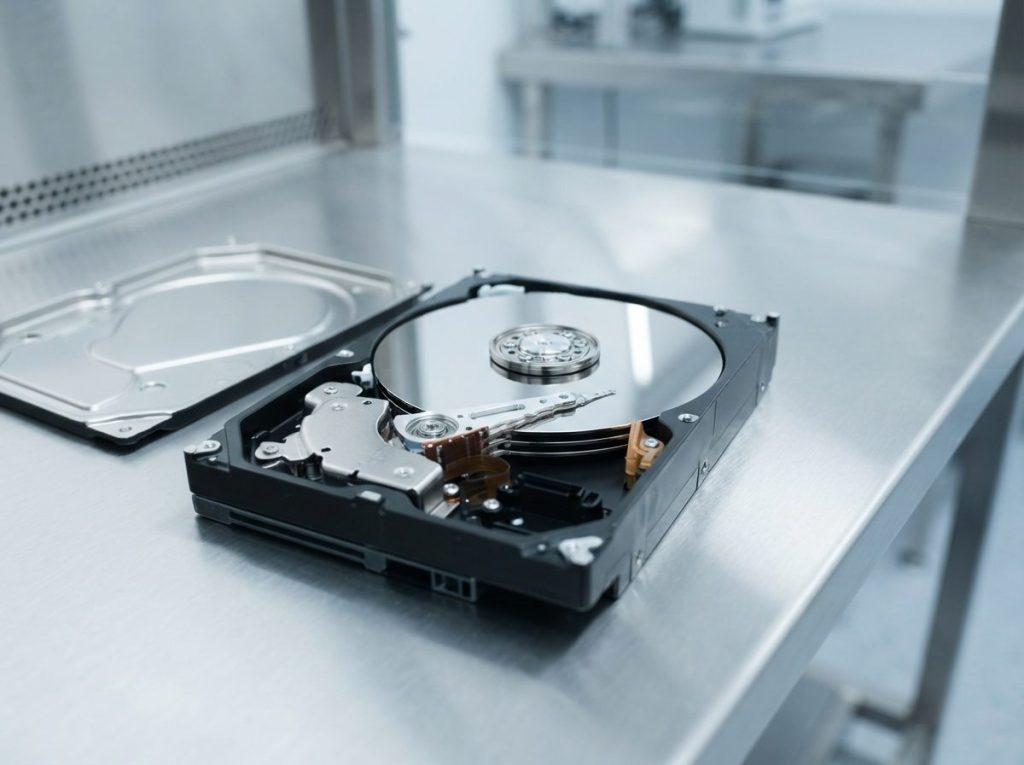
Inside a hard drive, the read/write heads float a tiny distance above spinning platters (the discs that hold your data). When heads fail, a technician has to replace them inside a dust-controlled environment. A single dust particle can scratch a platter for good. Prime Data Recovery does this work in an ISO certified Class 10 cleanroom at our North York lab.
Donor parts have to match closely, and finding the right one can take time. After the repair, the drive is still fragile. We read it with a hardware imager such as the DeepSpar Disk Imager, which controls how the drive is read and avoids hammering weak areas. Firmware faults are handled with PC-3000 tools that talk to the drive at a level normal computers can’t reach.
Is a low flat-rate price a good deal?
A low fixed price can be fine for a simple logical case, but it only helps you if it covers the work your device actually needs.
The real risk isn’t the price itself. It’s what happens if a damaged drive gets the wrong kind of attempt. Every time a drive with failing heads is powered on and pushed hard, more damage can happen. A failed first attempt can leave less data for anyone to recover later.
Whoever you talk to, ask these questions before you agree to anything:
- Will you diagnose the device and explain the problem before charging me?
- Do you have a cleanroom if the drive needs to be opened?
- Do you work from an image (a sector-by-sector copy) rather than the original drive?
- What happens to the price if the problem turns out to be more serious?
- Do I pay anything if no usable data is recovered?
- Can I check my recovered files before I pay?
Does the value of my data change the price?
No. A fair price reflects the technical work involved, not how important or emotional the files are to you.
Wedding photos and a folder of old downloads cost the same to recover if they sit on drives with the same fault. On the other hand, a single spreadsheet can cost more than a whole photo library if it’s on a drive with a head crash. It can help to know which files matter most to you, though. If the drive is badly damaged, the lab can focus on those folders first.
What should a data recovery quote include?
A good quote should tell you what’s wrong, what work is planned, what it will cost and what you can expect to get back.
Use this checklist when you read any quote:
- A clear diagnosis in plain words, such as “failed heads” or “corrupted firmware”.
- The planned work, for example cleanroom repair, imaging, then file recovery.
- A firm price that you approve before work starts.
- Payment terms that explain what happens if recovery isn’t possible.
- A way to check the results, such as a file list or review session.
- Delivery details, including what storage device your data comes back on.
- Privacy handling, meaning how your device and data are protected and what happens to copies afterwards.
For a closer look at how we approach pricing, see our page on data recovery cost.
How does Prime Data Recovery price a job?
Prime Data Recovery starts with a free evaluation, gives you a quote based on the actual fault, and works on a “No Data, No Fee” basis.
Our standard steps are:
- Free evaluation and diagnosis. We offer a fast, free diagnostic that typically takes about 30 minutes.
- Findings and quote. We explain what we found and what it will cost. Nothing goes ahead without your approval.
- Physical repair in the cleanroom, only if the device needs it.
- Controlled imaging. We copy the device without writing anything to the original.
- Recovery and verification. We recover files from the image and you check them in a file verification session before delivery.
- Delivery on a new storage device.
You can read each stage in more detail on our how the data recovery process works page.
Which mistakes make data recovery more expensive?
The most expensive mistakes are the ones that turn a simple problem into a complex one, like repeatedly powering a damaged drive or writing new data to it.
| Symptom | Likely cause | What to do | What not to do |
|---|---|---|---|
| Clicking, buzzing or grinding | Head or motor failure | Power off right away and get it evaluated | Restart it again and again, tap it, or open it |
| Files deleted from an SSD | Normal deletion, with TRIM (a command that tells the SSD to clear deleted blocks) likely active | Stop using the computer or drive as soon as you can | Keep working, install software or download files to that drive |
| Drive asks to be formatted or initialized | Damaged file system or partition table | Click cancel and disconnect safely | Format, initialize, or run CHKDSK, fsck or Disk Utility First Aid |
| Laptop or drive got wet | Liquid on the circuit board | Leave it off and unplugged | Charge it, power it on or use a hair dryer |
| RAID or NAS shows failed or degraded disks | One or more member disks failing | Label the disk order and shut down cleanly | Start a rebuild, swap disks around or reinitialize the array |
| External drive not detected | Cable, port, enclosure or drive fault | Try another cable, port or computer, and check Disk Management | Keep reconnecting it if it makes any unusual noise |
If the data matters, avoid trying one recovery program after another. Read-only recovery software exists for simple logical problems on healthy drives. But every attempt on a failing drive puts more wear on it and can lower the chance of success.
How is my data kept private during recovery?
A trustworthy lab treats your device and files as confidential from the moment they arrive until they’re returned to you.
Recovery means a technician can see what’s on your drive, so ask how access is controlled and what happens to working copies afterwards. At Prime, devices are handled confidentially and securely, and personal information is managed in line with Canadian privacy law (PIPEDA). If you’re a business with specific requirements, raise them when you request your quote.
When should you get professional help?
Get professional help right away if the drive makes unusual noises, was dropped, got wet, went through a power surge, isn’t spinning, or holds data you can’t afford to lose.
The same goes for any RAID, NAS or server, and for deleted files on an SSD where time matters. You can make a few safe checks yourself: try another cable, port or computer, and see whether the drive shows up in BIOS or Disk Management. Stop there if nothing changes.
Key takeaways
- Data recovery pricing is based on the fault and the work it needs, not on how valuable the files feel.
- Physical damage, SSD controller faults and RAID failures take far more time and equipment than logical problems.
- A fair quote comes after a diagnosis and explains the problem, the plan, the price and the payment terms.
- A cheap first attempt on a damaged drive can cost more in the end if it causes further damage.
- Power off a noisy or damaged drive and avoid formatting, CHKDSK and rebuilds. This keeps your options, and often your costs, under control.
Get a clear quote before you decide
Prime Data Recovery is an independent lab in North York, Toronto, serving the GTA, and customers across Canada can ship their devices to us. Evaluations are free, you approve the quote before work begins, and you pay nothing under our “No Data, No Fee” policy if we can’t recover your data. Request a free quote or call (416) 661-1112 to talk through your situation.
Frequently Asked Questions
Why did two labs give me very different quotes for the same drive?
Quotes often differ because each lab's diagnosis was different, or because one quote doesn't include all the work your drive needs. Ask each provider to explain the fault in plain words and list the planned steps. Also ask what happens if the problem turns out to be worse. A quote that names the fault and the method is easier to compare than a single number.
Is it worth paying for data recovery if I only need a few files?
That depends on how much the files matter to you, because the cost comes from the fault, not from how many files you want back. Telling the lab which folders matter most helps, especially on badly damaged drives where reading time is limited. A free evaluation shows you the real price first, so you can decide with clear information.
Can I lower the cost by trying recovery software first?
Only for simple logical problems on a drive that's healthy and quiet. Even then, never install the software on the affected drive or save recovered files to it. If the drive clicks, runs very slowly, disconnects or holds important data, skip the software. Each attempt adds wear and can turn a simpler job into a harder, more expensive one.
Do I have to pay if my data can't be recovered?
Prime Data Recovery works on a No Data, No Fee basis, so you don't pay for the recovery if we can't recover your data. The evaluation is also free. Before you approve any work, we explain what we found and what it will cost. You can then decide whether to go ahead.
Does data recovery cost more for a business server than a personal laptop?
Usually, yes. Servers often use RAID arrays with several disks. Each disk has to be imaged on its own, and then the array has to be rebuilt virtually before files can be recovered. That takes more time and equipment than a single laptop drive. Prime offers 24/7 emergency support for servers when downtime is a concern.
