
Quick answer: You can often recover data from a USB flash drive after deletion, formatting, corruption or even physical breakage. What matters most is whether the memory chip is intact and whether new data has overwritten your files. Stop using the drive right away, skip repair tools, and get a professional evaluation if the files matter.
Can you recover data from a USB flash drive?
In most cases, yes. If the memory chip inside is undamaged and your files haven’t been overwritten, you can usually recover data from a USB flash drive, even when the computer can’t read it. Recovery fails mainly when new data replaces the old or the memory chip itself is cracked.
The outcome depends on three things: what went wrong, what has happened to the drive since, and how carefully you handle it from here. A USB stick that was deleted by mistake is a very different job from one that snapped in half in a laptop port. Both are often recoverable, but they need different approaches.
What is inside a flash drive, and why does it matter for recovery?
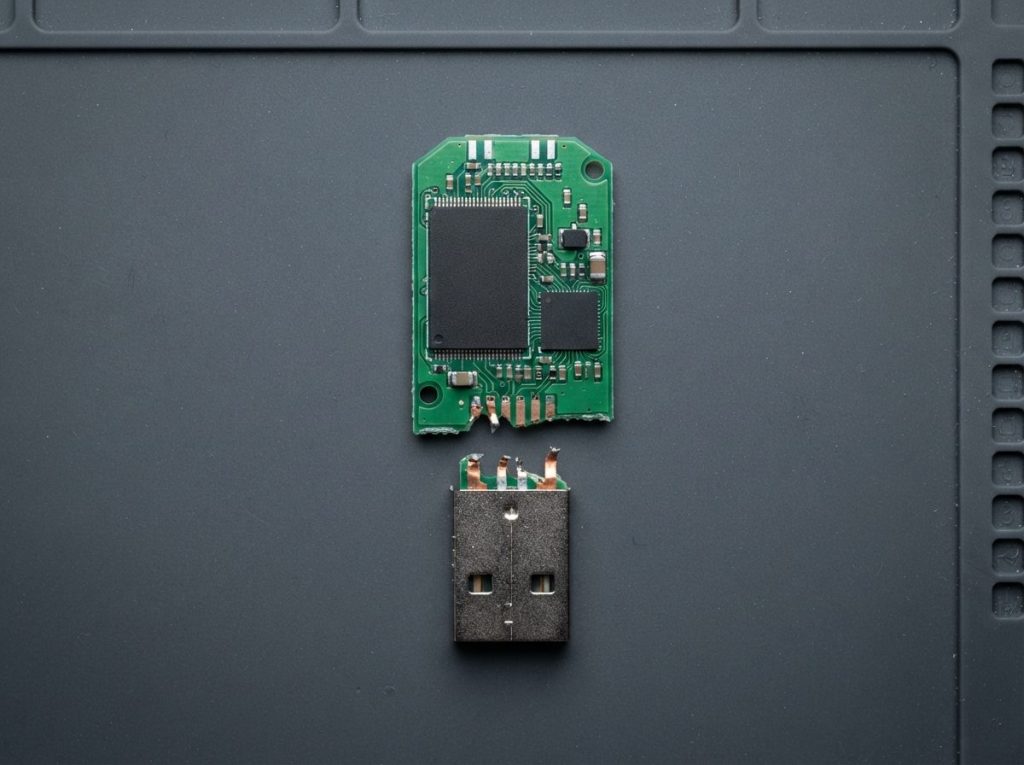
A USB flash drive is a small circuit board with a USB connector, a controller chip and one or more NAND memory chips, and each part can fail on its own. Knowing which part failed tells you a lot about your chances.
- NAND memory: the chips that actually hold your files, stored as electrical charges in memory cells. As long as these chips are intact, the data is usually still there.
- Controller: the drive’s small processor. It talks to your computer, spreads writes evenly across the memory (wear levelling) and corrects errors. It also keeps a private map of where each piece of each file really sits.
- PCB and connector: the printed circuit board (PCB) links everything together. The USB plug is soldered to it, which makes it the weak point when a drive is bent or knocked.
Here is why that map matters. The controller doesn’t store your files in neat order. It scatters them across the NAND and often scrambles the data as part of its normal work. If the controller dies, the files are still on the chip, but they can’t be read in a usable form until a specialist rebuilds the controller’s logic.
How recoverable is each type of flash drive problem?
Logical problems such as deletion, quick formatting or file system corruption usually have the best outlook. Hardware faults are often recoverable too, but they need lab work. Use this table to match what you see with what is likely happening.
| Symptom | Likely cause | What to do | What not to do |
|---|---|---|---|
| Files deleted, drive works normally | Entries removed from the file system; the data usually remains until overwritten | Unplug it and stop saving anything to it | Don’t copy new files to the stick or keep using it “for now” |
| Drive was formatted by mistake | A quick format rebuilds the file system tables; a full format may also wipe the contents | Stop using it and note which format type was used, if you know | Don’t format it again or try a different file system |
| Windows asks “You need to format the disk”, or the drive shows as RAW | Damaged file system (FAT32, exFAT or NTFS) | Click Cancel, then safely eject the drive | Don’t accept the format prompt or run CHKDSK |
| Not detected at all, or shows 0 MB or a strange capacity | Controller or firmware fault, or a broken connection on the board | Try one other port and one other computer, then stop | Don’t use “low-level format” or controller reflash tools |
| Connects and disconnects, or freezes during copying | Worn NAND, a failing controller or a cracked solder joint | Stop trying to copy; every retry stresses weak memory | Don’t wiggle the plug to find a “working position” |
| Snapped, bent or loose connector | Physical damage to the PCB or the connector’s solder pads | Keep all pieces in a small bag and leave it unplugged | Don’t tape, glue or solder it yourself |
| Got wet or went through the washing machine | Possible corrosion or short circuits on the board | Leave it unplugged and get it evaluated soon | Don’t plug it in to “test” it or dry it with a hair dryer |
What should you do first when a flash drive stops working?
The safest first move is to stop writing anything to the drive and limit yourself to simple checks that only read from it. These steps rule out a bad port or cable without putting your files at risk:
- Stop using the drive. Don’t save, copy, install or move anything onto it.
- Try a different USB port, ideally one directly on the computer rather than on a hub, dock or front panel.
- Try one other computer. If it works there, copy your important files off immediately.
- Check whether the system sees it. On Windows, open Disk Management. On a Mac, open Disk Utility. Only look; don’t click repair, initialize or format.
- Write down what happened. Note the symptoms, any error messages and what you’ve already tried. This speeds up diagnosis.
- Stop if anything looks physical. A bent plug, cracked casing, liquid exposure, a hot drive or a burning smell means no more testing.
Common mistakes that make recovery harder
- Accepting the format prompt. It looks like a fix, but it rewrites the very structures a recovery relies on.
- Running CHKDSK or another repair utility. These tools “fix” the file system by changing it. Damaged entries can get deleted for good.
- Saving recovered files back onto the same stick. That overwrites the data you’re trying to rescue.
- Repeated plugging and unplugging. A weak controller or worn memory can degrade further with every attempt.
- Home repairs on a broken connector. Too much heat or a solder bridge can damage tiny pads and, sometimes, the memory chip itself.
What happens if the flash drive is snapped, bent or water damaged?
A physically broken flash drive is often still recoverable, because the damage is usually to the connector or board rather than to the NAND chip that holds the data. If the memory chip is cracked or shattered, though, recovery is generally not possible.
When only the connector has broken off, a technician can often repair the board connections under magnification. When the board or the controller is beyond repair, the next option is chip-off recovery. The NAND chip is carefully removed and read directly in a specialist reader. The raw dump is then put back together by reversing the controller’s scrambling, error correction and file mapping.
Some small drives are monolithic: the controller and memory are sealed together in a single block, so there is no separate chip to remove. For these, technicians locate tiny test points on the underside of the package and connect to them directly to read the memory.
With liquid damage, time matters. Corrosion can keep spreading after the drive looks dry. Keep it unplugged, don’t apply heat, and have it cleaned and assessed before anyone tries to power it.
How do professionals recover data from a failed USB stick?
Professional flash drive recovery follows a careful order: diagnose, agree on the work, repair only if needed, copy the data in a controlled way, then rebuild the files from that copy. At Prime Data Recovery in North York, Toronto, this is the same process we follow for every device:
- Free evaluation and diagnosis. We find out whether the fault is logical, electronic or physical.
- Findings and quote. You get a clear explanation and a quote, and nothing proceeds without your approval.
- Repair if needed. This can mean fixing the board or connector, or preparing a chip-off or monolith read.
- Controlled imaging. We make a complete copy (an “image”) of the memory without writing to the original. For flash media, tools such as PC-3000 Flash and Rusolut Visual NAND Reconstructor read the NAND and rebuild the controller’s data layout.
- Recovery and verification. Files are extracted from the image, never from the original stick. Then you check them in a file verification session before delivery.
- Delivery on new storage. Your recovered data is returned on a new, healthy device.
You can read more about each stage on our page explaining how the data recovery process works.
Is recovery software safe to use on a USB flash drive?
Read-only recovery software can help with simple deletions on a drive that is otherwise healthy, but it can’t fix hardware faults and can make things worse if used carelessly. It only works when the computer can see the drive and its correct capacity.
If you try it, use a tool that reads without writing to the stick, and save results to a different drive. Stop straight away if the stick disconnects, shows the wrong size or slows to a crawl. Those are hardware warning signs. If the files are important, skip trial and error entirely, because each failed attempt can lower the chance of a full recovery.
One useful detail: unlike internal SSDs, most ordinary USB sticks don’t receive TRIM commands, the instruction that lets a drive erase deleted blocks in the background. So deleted files often remain in the memory until new data overwrites them. Some faster USB drives built like SSDs may behave differently, which is one more reason to stop using any drive as soon as you notice the loss.
When should you get professional help?
Get professional help when the data matters and the drive shows any hardware symptom, or when simple checks haven’t brought it back. In particular, reach out if:
- The drive isn’t detected anywhere, or shows 0 MB or an odd capacity.
- It’s snapped, bent, cracked, wet or was exposed to heat.
- It holds files you can’t replace, such as business records, photos or research.
- Software found the files, but they open corrupted or empty.
- Someone has already tried a repair or a reflash tool on it.
The same principles apply to memory cards, which use similar controllers and NAND. See our SD card data recovery service if a camera card is the problem. For USB sticks specifically, our USB flash drive recovery page covers what we handle.
Key takeaways
- Data on a failed USB flash drive is usually still on the NAND chip. Overwriting and a cracked chip are the main reasons recovery fails.
- Stop using the drive straight away and never accept a format prompt or run CHKDSK.
- Safe checks are limited to another port, another computer and simply viewing the drive in Disk Management or Disk Utility.
- Snapped, wet and undetected drives are often recoverable with board repair, chip-off or monolith techniques.
- A professional lab works from an image of the memory, never the original, and verifies files with you before delivery.
Need help with a USB flash drive?
Prime Data Recovery is an independent lab in North York, and it’s highly rated on Google. We offer a free quote and evaluation, a “No Data, No Fee” policy, and confidential handling in line with Canadian privacy law (PIPEDA). Customers across Canada can ship their devices to us. Request your free evaluation and tell us what happened to your drive.
Frequently Asked Questions
Can a USB flash drive that shows 0 MB be recovered?
Often, yes. A flash drive that shows 0 MB, 8 MB or another wrong capacity usually has a controller or firmware fault, not empty memory. The files typically remain on the NAND chip. A lab can read the chip directly and rebuild the data. Avoid reflash or low-level format tools, as they can wipe the controller's map of your files.
Can I recover files from an encrypted USB flash drive?
It depends on the type of encryption. With software encryption, a lab can often recover the encrypted data, which you then unlock with your password. Hardware-encrypted drives tie the keys to their own controller, so a working controller and your password are usually needed. Chip-off recovery alone generally cannot decrypt them. Keep your password ready for the evaluation.
Can data be recovered after a flash drive was overwritten?
Once the old data in a memory location has been replaced with new data, that original data can't be recovered. Overwriting is often partial, though. Some files or fragments may survive in areas that weren't reused. This is why it's worth stopping use immediately and having the drive evaluated, rather than assuming everything is gone.
Is it safe to mail a broken USB stick for data recovery in Canada?
Yes, if it's packed carefully. Put the drive and any broken pieces in a small anti-static or zip bag. Then cushion it in a padded envelope or small box so it can't bend in transit. Include a note describing the symptoms. Don't tape broken parts together. Use a trackable shipping service so you know when it arrives.
How long does data last on a USB flash drive that sits unused?
Flash memory holds data as electrical charges that slowly leak over time. Retention depends on the memory type, how worn the drive is and the storage temperature, and heat speeds up the loss. USB sticks are handy for moving files, but they're not a reliable long-term archive. Keep important data in at least two other places.
Will a data recovery lab look through my personal files?
A professional lab only accesses what's needed to recover and verify your data. At Prime Data Recovery, devices and files are handled confidentially and in line with Canadian privacy law (PIPEDA). You confirm which files matter during the verification session. That way the check focuses on your priorities rather than browsing your content.
